For Mac · iMessage, SMS, WhatsApp and calls
iPhone messages and call records in one dated, numbered PDF.
Message Mammoth reads your iPhone or Mac and produces a PDF in date order, with a number and a full timestamp on every message. The cover page states what was included and every filter applied. For court proceedings, disputes and claims.
Preview every message free. $29.99 once for unlimited exports. Requires a Mac with macOS 13 or later. If you don't have a Mac

Multiple sources
iMessage, SMS, WhatsApp, and phone and FaceTime call records, from your iPhone and Mac. A message on several devices is counted once.
One chronological record
Several sources combined in date order, filtered by person, date or keyword.
Export again later
Save an export and run it again when there is more. Each run is compared with the last: what is new, what was edited and what is no longer there.
Stored on your Mac
Your messages never leave your Mac. You choose what is copied and what goes in each export, and a password lock can encrypt the copies, change records, merges and export settings the app keeps.
- No account
- Messages never uploaded
- Read-only
- One-time Personal price
- 30-day refund
Common uses
Court proceedings
A dated record of a conversation for your lawyer or the court.
Landlord and employment disputes
A numbered record of what each party said and when.
Insurance claims
The messages that support a claim, with dates and times.
Law offices
Client work needs a firm license. Email support@messagemammoth.com.
Why screenshots fall short
Screenshots
- Dates appear every few messages; times rarely appear
- Hours of scrolling, cropping and ordering
- Reactions, replies and edits are easily lost or misread
- No way to show what falls between two screenshots
Message Mammoth PDF
- Date, time and time zone on every message; calls and group changes show the time of day
- A 3,000-message conversation exported in about 15 seconds in our tests, once the messages are on your Mac
- Reactions, replies, group changes and iMessage edits written out
- Numbered messages and a printed count show whether a message or page was later removed from the export
How an export is made
-
1
Choose a source
This Mac: if Messages on your Mac shows the conversation, it opens in seconds.
Your iPhone: connect it with a cable. A messages-only copy usually takes 3 to 15 minutes on a phone without backup encryption. With photos, or when the phone's backups are encrypted, the whole backup is copied: allow 15 to 50 minutes, depending on how full the phone is. The app shows progress as it copies.
-
2
Read and select
Read any conversation in full, jump to a date or find a word, before you buy or export. If one person has several numbers, emails or apps, merge them so the export misses none of their messages. Then select the person or group, a date range, sent or received, a word or phrase, or only messages with attachments.
-
3
Export
A PDF to print or send, a CSV spreadsheet for your lawyer or your records, and optionally plain text and the original photos in a folder. A SHA-256 manifest file lists the hash of each file.


Sources
WhatsApp records
WhatsApp chats export in the same numbered, dated format as your messages. WhatsApp stores its data separately from Apple's Messages app, so there are two routes. Both produce the same cover page and integrity record. A copy from WhatsApp for Mac has no photos or WhatsApp calls and may be partial.
iPhone with a cable · full history
Full history from your iPhone
- Connect the iPhone and choose what to copy.
- The app copies the phone's messages to your Mac, including WhatsApp.
- Select the WhatsApp chat alongside your iMessage conversations and export.
Note: includes replies, reactions and WhatsApp calls. A messages-only copy can finish before WhatsApp's data has arrived, so include photos to copy the whole backup. Allow 15 to 50 minutes, depending on how full the phone is, and keep the phone unlocked. Encrypted backups are supported: enter the backup password when asked.
WhatsApp for Mac · no cable
What is stored on this Mac
- In Message Mammoth, press Start a new pull for this Mac to see what is available.
- Select WhatsApp. The app shows how many messages this Mac holds, and their dates.
- Select the chat and export as usual.
Note: this is the fastest route if WhatsApp is already on your Mac. The app shows what is there before you export, and the cover page states that the copy may be partial and has no photos.
For the full history, use the iPhone. A copy from this Mac may be partial.
What the PDF contains
Laid out for review by a judge, mediator, lawyer or HR team.
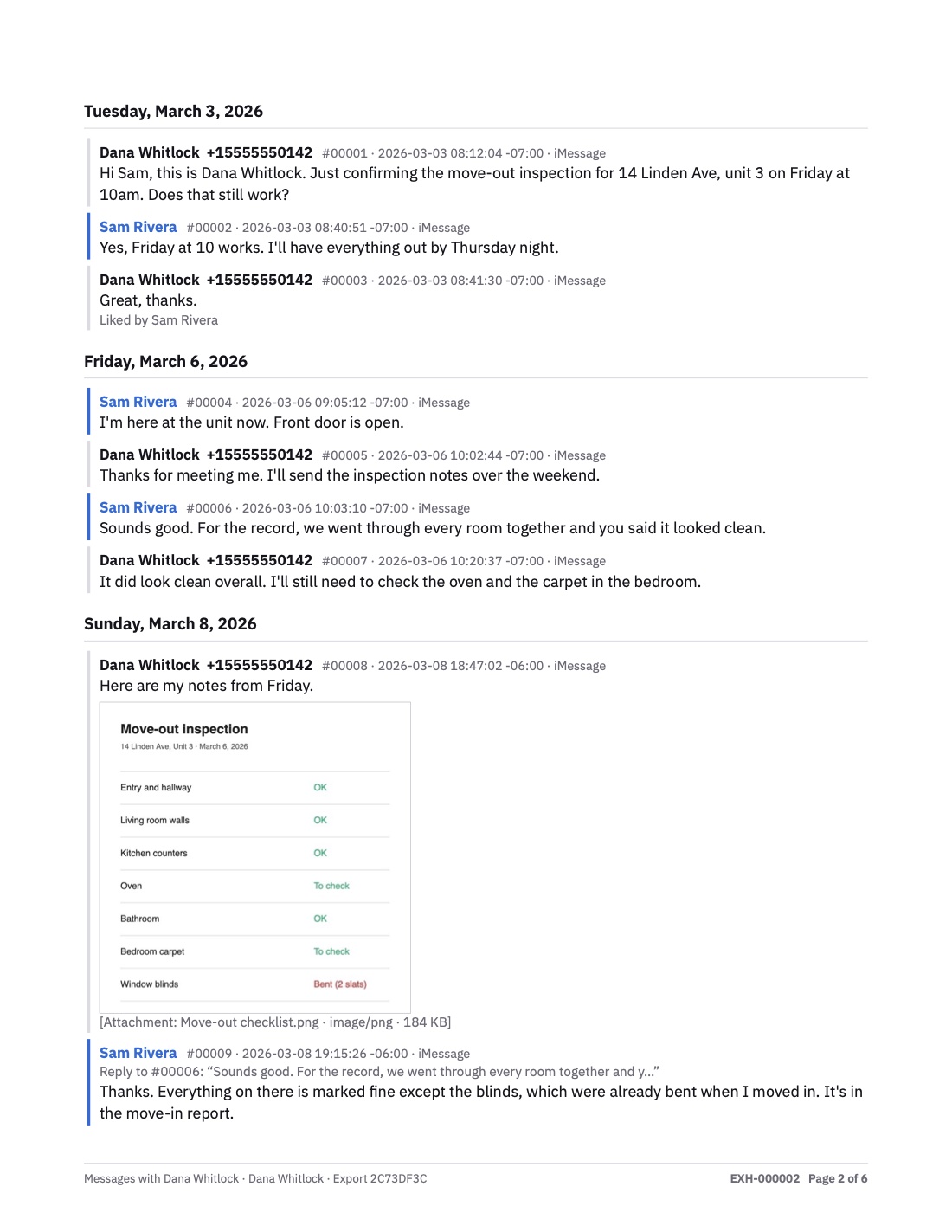
- A number on every message
- #00001, #00002 and so on, so any reader can cite an exact message and check that none was removed from the export afterwards.
- Full date and time on each message
- With seconds and the UTC offset, in your time zone or in UTC.
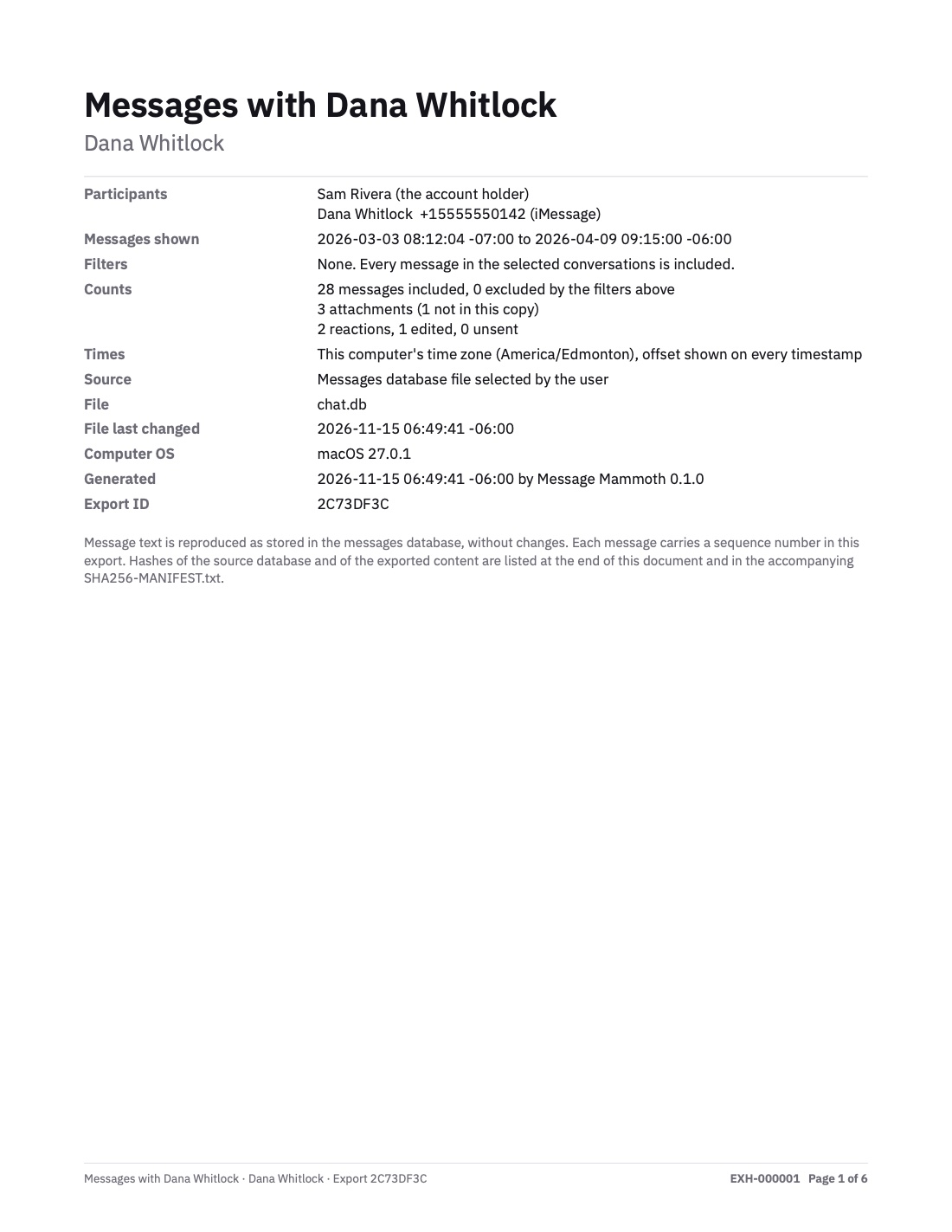
- Cover page
- The participants, the date range, every filter applied, and how many messages were included or excluded.
- Page numbers and stamps
- "Page 3 of 6" on every page, plus an optional stamp such as EXH-000003.
- Photos, reactions, replies and edits
- Photos printed in place. "Emphasized by Dana", "Reply to #00006" and "Edited 17:48" written out in words. Edits are shown for iMessage.
- Missing attachments stated
- If a photo is not on the device (often because it is still in iCloud), the PDF states this instead of leaving a gap.
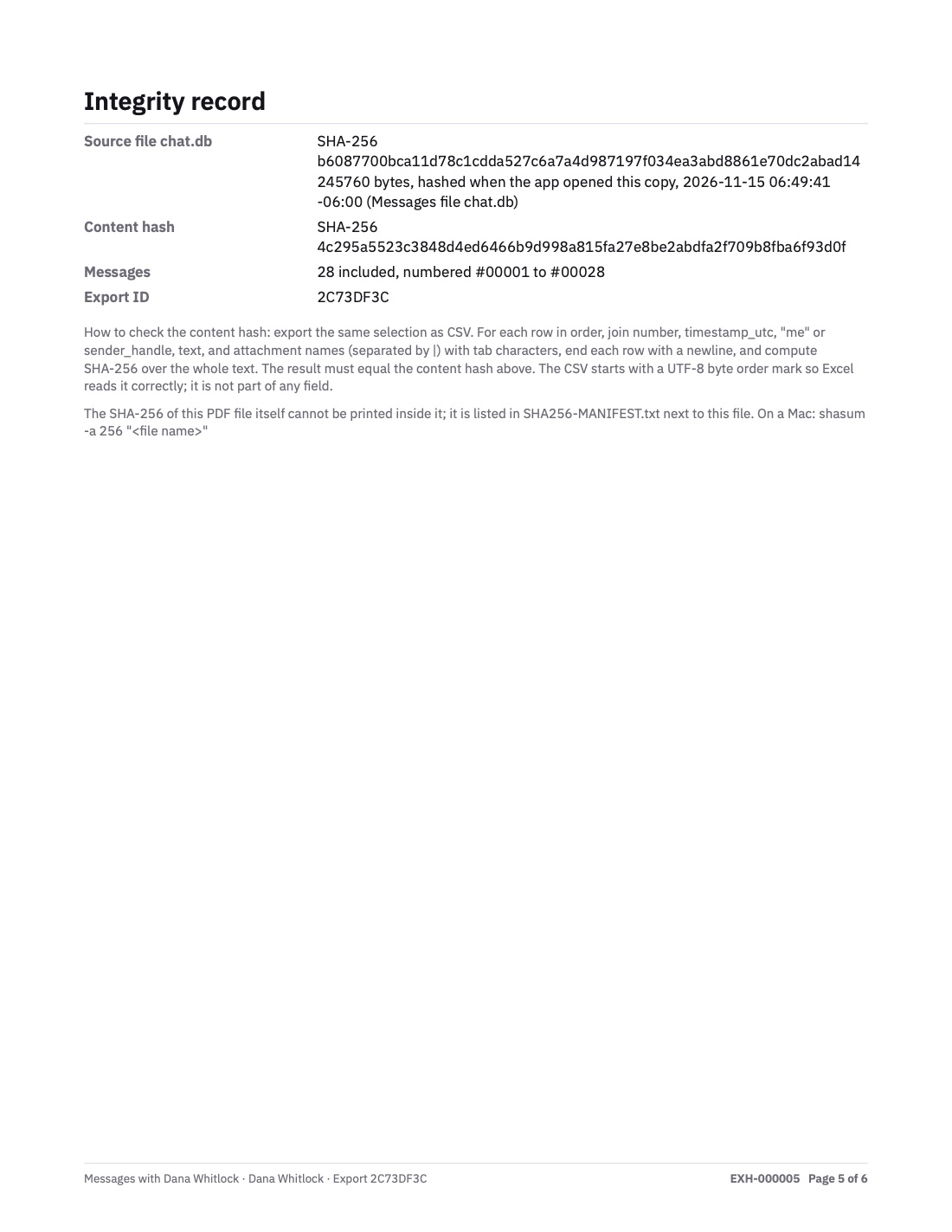
- Integrity page
- SHA-256 hashes of the source database and the exported messages, with instructions a technical reviewer can use to check whether the files have changed.
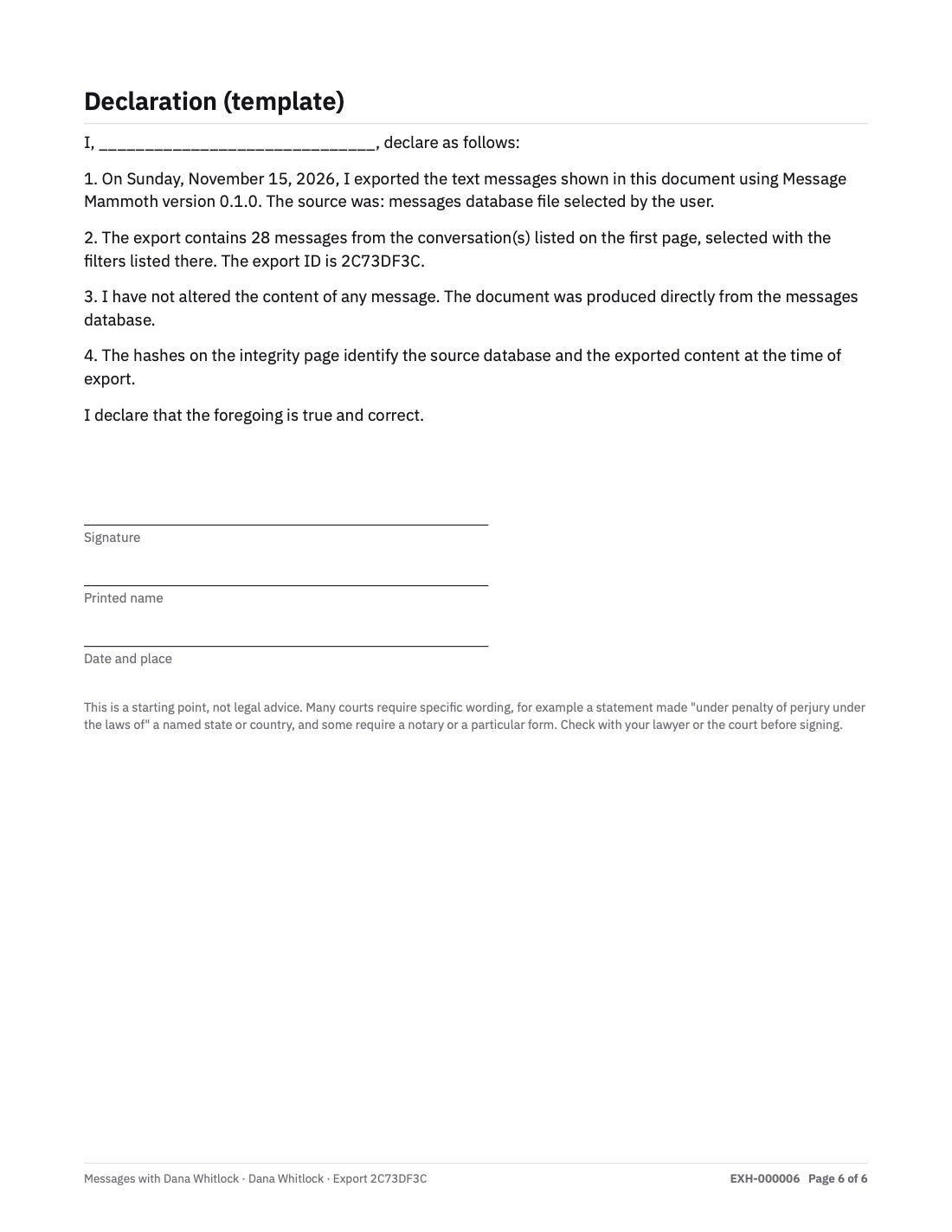
- Declaration template
- An optional page to adapt with your lawyer and sign, stating how and when the export was made.
Your messages never leave your Mac.
Messages, contacts and photos are read and converted to files on your Mac only. There is no server that could receive them.
Reads
The Messages database, WhatsApp and call records on this Mac, a file you select, or a backup made from your iPhone over the cable. Contact names, so exports show names instead of numbers.
Writes
Your exports, in the folder you choose. A temporary private copy of the database while it is open, deleted afterwards. Copies pulled from this Mac and from your iPhone, which can take many gigabytes with attachments. Records of what changed between copies, which can include the text of messages no longer in a newer copy. Saved exports and the people you merged. These stay on your Mac until you delete them in the app. With the password lock on, saved copies, the records of changes between them, merges and saved export settings are kept encrypted; your exports and one-time iPhone copies are not.
Goes online only to
Check your license key and look for updates. A license check sends the key and a one-way fingerprint of this Mac that does not reveal its hardware ID; an update check downloads one small file from this website. Like any web request, both reach a server with your IP address. Neither contains anything about your messages or contacts. No analytics, crash reports or account.
Pricing
Preview is free. Exports beyond the 20-message trial require a license.
Free
$0
- Open your Mac's Messages, an iPhone or a backup
- Search, filter and preview every message
- Trial exports of up to 20 messages in total, calls and group events included, with every feature (cover page, numbers, hashes, declaration)
For your own messages
Personal
$29.99 once
- Unlimited exports of any length
- All sources: iMessage, SMS, WhatsApp and calls
- All evidence features: numbers, timestamps, cover, integrity and declaration pages, page stamps
- PDF, CSV and text
- Saved exports that run again and show what changed since the last run
- On up to 3 of your Macs
- All future updates to Personal, with no further payment
- 30-day money-back guarantee
Law offices and firms: Personal covers your own messages. For client work, email us about a firm license.
Prices in US dollars. Sales tax or VAT is added at checkout where applicable.
Frequently asked questions
Will a court accept this PDF?
Each court and judge decides what evidence to accept and how it must be presented. Message Mammoth produces a record that is straightforward to check: numbered, dated messages, a cover page listing exactly what was included, and SHA-256 hashes. Your lawyer or the court clerk can confirm the required format. Many people provide both the PDF and the CSV.
What if the other side says messages were deleted before I exported?
The export shows what was on your Mac or iPhone when it was made, not what was there earlier. Export early and keep the SHA-256 manifest file. Sending it to your lawyer the same day gives someone else a dated copy. A later copy of the same source shows what is no longer there. Keep the phone and the conversation as well, because the original phone is what gets examined if the question arises.
I don't have a Mac. What are my options?
The app requires a Mac, but it does not have to be yours. It reads your iPhone over a cable, so a friend's or family member's Mac will work: export, take the files with you, then on that Mac use Reset app, delete the export folder and deactivate the license. Without a Mac, the free methods in our guide to printing text messages for court are available for shorter conversations. Message Mammoth runs on macOS.
Do I need my iPhone?
Not if the conversation is on your Mac. If Messages in iCloud is on, open Messages on your Mac and confirm that the conversation goes back far enough. If it does not, or you need photos stored only on the phone, connect the iPhone with a cable.
How long does the iPhone option take?
The phone takes 1 to 3 minutes to prepare before any data moves. A messages-only copy then usually takes 3 to 15 minutes on a phone without backup encryption. With photos, or on a phone with encrypted backups, the whole backup is copied: allow 15 to 50 minutes, depending on how full the phone is. The app shows progress as it copies. Keep the phone unlocked and connected.
Is it safe to give the app Full Disk Access?
macOS protects the Messages folder, so any app that reads it needs Full Disk Access, which you switch on in System Settings. It only needs to be on while the app copies your messages, and you can switch it off afterwards. The app only reads: it never changes or sends a message, and your messages never leave your Mac. To avoid granting access, copy chat.db, chat.db-shm and chat.db-wal together from ~/Library/Messages in Finder and open the copy; without chat.db-wal the newest messages can be missing, and a copy made this way has no photos. Or use the iPhone option, which does not need Full Disk Access.
Does it support the latest iOS and macOS?
It is built for the Messages formats in macOS 27 and iOS 27. Apple changes the Messages database from time to time, and updates keep the app current.
Will my lawyer be able to use the CSV?
Yes. It opens in Excel, Numbers or Google Sheets, with one row per message and the same numbers as the PDF, so both of you can refer to "#00017".
Can it recover deleted messages?
It does not recover permanently deleted messages. It exports the messages on your Mac or iPhone at the time of export, including messages still in Recently Deleted and messages kept in an earlier copy the app made, and marks them as such. Edited and unsent messages are marked too.
Does it work with encrypted iPhone backups?
Yes. Enter the backup password when asked, and the app reads the backup on your Mac.
Does it support WhatsApp?
Yes. Copy the full history from your iPhone over a cable, or read what WhatsApp has stored on this Mac. Compare the two routes or read the WhatsApp guide.
Does it include phone and FaceTime calls?
Yes. From an iPhone, phone and FaceTime call history comes from an encrypted backup, because Apple leaves it out of unencrypted ones. From a Mac, the app reads the recent calls stored there. WhatsApp calls come with the WhatsApp data. See the call history guide.
What about Android, Signal or Telegram?
Message Mammoth works from iPhones and Macs, and covers iMessage, SMS, WhatsApp and calls. Texts with people on Android are included, because they are stored on your iPhone.
How is this different from other apps?
As of November 2026, Decipher sells WhatsApp export as a separate product, and iMazing exports Messages and WhatsApp separately. Message Mammoth combines messages, WhatsApp and call records in one timeline, saves exports to run again and compares each run with the last, and includes message numbers, time zone offsets, counts, hashes and a declaration page in the one-time Personal price. See the full comparison.
What if it does not do what I need?
Preview it free first. If you buy and it does not do what you need, email us within 30 days for a full refund. See the refund policy.
Further answers are in the guides: saving texts as a PDF, exporting from iPhone, exporting iMessages on a Mac, what iCloud keeps.

About
Message Mammoth is made by Nicolas Zawadzki, an independent developer. Support: support@messagemammoth.com.
Review every message before you buy.
Download the app, open your Messages or connect your iPhone, and preview every message free.
Download free for MacmacOS 13 or later · Apple silicon and Intel